Class Scrollbar
- All Implemented Interfaces:
Adjustable, ImageObserver, MenuContainer, Serializable, Accessible
Scrollbar class embodies a scroll bar, a
familiar user-interface object. A scroll bar provides a
convenient means for allowing a user to select from a
range of values. The following three vertical
scroll bars could be used as slider controls to pick
the red, green, and blue components of a color:

Each scroll bar in this example could be created with code similar to the following:
redSlider=new Scrollbar(Scrollbar.VERTICAL, 0, 1, 0, 255);
add(redSlider);
Alternatively, a scroll bar can represent a range of values. For example, if a scroll bar is used for scrolling through text, the width of the "bubble" (also called the "thumb" or "scroll box") can be used to represent the amount of text that is visible. Here is an example of a scroll bar that represents a range:
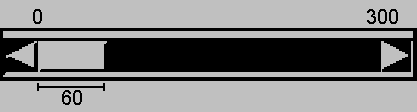
The value range represented by the bubble in this example is the visible amount. The horizontal scroll bar in this example could be created with code like the following:
ranger = new Scrollbar(Scrollbar.HORIZONTAL, 0, 60, 0, 300);
add(ranger);
Note that the actual maximum value of the scroll bar is the
maximum minus the visible amount.
In the previous example, because the maximum is
300 and the visible amount is 60, the actual maximum
value is 240. The range of the scrollbar track is 0 - 300.
The left side of the bubble indicates the value of the
scroll bar.
Normally, the user changes the value of the scroll bar by making a gesture with the mouse. For example, the user can drag the scroll bar's bubble up and down, or click in the scroll bar's unit increment or block increment areas. Keyboard gestures can also be mapped to the scroll bar. By convention, the Page Up and Page Down keys are equivalent to clicking in the scroll bar's block increment and block decrement areas.
When the user changes the value of the scroll bar, the scroll bar
receives an instance of AdjustmentEvent.
The scroll bar processes this event, passing it along to
any registered listeners.
Any object that wishes to be notified of changes to the
scroll bar's value should implement
AdjustmentListener, an interface defined in
the package java.awt.event.
Listeners can be added and removed dynamically by calling
the methods addAdjustmentListener and
removeAdjustmentListener.
The AdjustmentEvent class defines five types
of adjustment event, listed here:
AdjustmentEvent.TRACKis sent out when the user drags the scroll bar's bubble.AdjustmentEvent.UNIT_INCREMENTis sent out when the user clicks in the left arrow of a horizontal scroll bar, or the top arrow of a vertical scroll bar, or makes the equivalent gesture from the keyboard.AdjustmentEvent.UNIT_DECREMENTis sent out when the user clicks in the right arrow of a horizontal scroll bar, or the bottom arrow of a vertical scroll bar, or makes the equivalent gesture from the keyboard.AdjustmentEvent.BLOCK_INCREMENTis sent out when the user clicks in the track, to the left of the bubble on a horizontal scroll bar, or above the bubble on a vertical scroll bar. By convention, the Page Up key is equivalent, if the user is using a keyboard that defines a Page Up key.AdjustmentEvent.BLOCK_DECREMENTis sent out when the user clicks in the track, to the right of the bubble on a horizontal scroll bar, or below the bubble on a vertical scroll bar. By convention, the Page Down key is equivalent, if the user is using a keyboard that defines a Page Down key.
The JDK 1.0 event system is supported for backwards compatibility, but its use with newer versions of the platform is discouraged. The five types of adjustment events introduced with JDK 1.1 correspond to the five event types that are associated with scroll bars in previous platform versions. The following list gives the adjustment event type, and the corresponding JDK 1.0 event type it replaces.
AdjustmentEvent.TRACKreplacesEvent.SCROLL_ABSOLUTEAdjustmentEvent.UNIT_INCREMENTreplacesEvent.SCROLL_LINE_UPAdjustmentEvent.UNIT_DECREMENTreplacesEvent.SCROLL_LINE_DOWNAdjustmentEvent.BLOCK_INCREMENTreplacesEvent.SCROLL_PAGE_UPAdjustmentEvent.BLOCK_DECREMENTreplacesEvent.SCROLL_PAGE_DOWN
Note: We recommend using a Scrollbar
for value selection only. If you want to implement
a scrollable component inside a container, we recommend you use
a ScrollPane. If you use a
Scrollbar for this purpose, you are likely to
encounter issues with painting, key handling, sizing and
positioning.
- Since:
- 1.0
- See Also:
-
Nested Class Summary
Nested ClassesModifier and TypeClassDescriptionprotected classThis class implements accessibility support for theScrollbarclass.Nested classes/interfaces declared in class Component
Component.AccessibleAWTComponent, Component.BaselineResizeBehavior, Component.BltBufferStrategy, Component.FlipBufferStrategyModifier and TypeClassDescriptionprotected classInner class of Component used to provide default support for accessibility.static enumEnumeration of the common ways the baseline of a component can change as the size changes.protected classInner class for blitting offscreen surfaces to a component.protected classInner class for flipping buffers on a component. -
Field Summary
FieldsModifier and TypeFieldDescriptionstatic final intA constant that indicates a horizontal scroll bar.static final intA constant that indicates a vertical scroll bar.Fields declared in class Component
accessibleContext, BOTTOM_ALIGNMENT, CENTER_ALIGNMENT, LEFT_ALIGNMENT, RIGHT_ALIGNMENT, TOP_ALIGNMENTModifier and TypeFieldDescriptionprotected AccessibleContextTheAccessibleContextassociated with thisComponent.static final floatEase-of-use constant forgetAlignmentY.static final floatEase-of-use constant forgetAlignmentYandgetAlignmentX.static final floatEase-of-use constant forgetAlignmentX.static final floatEase-of-use constant forgetAlignmentX.static final floatEase-of-use constant forgetAlignmentY().Fields declared in interface Adjustable
NO_ORIENTATIONModifier and TypeFieldDescriptionstatic final intIndicates that theAdjustablehas no orientation.Fields declared in interface ImageObserver
ABORT, ALLBITS, ERROR, FRAMEBITS, HEIGHT, PROPERTIES, SOMEBITS, WIDTHModifier and TypeFieldDescriptionstatic final intThis flag in the infoflags argument to imageUpdate indicates that an image which was being tracked asynchronously was aborted before production was complete.static final intThis flag in the infoflags argument to imageUpdate indicates that a static image which was previously drawn is now complete and can be drawn again in its final form.static final intThis flag in the infoflags argument to imageUpdate indicates that an image which was being tracked asynchronously has encountered an error.static final intThis flag in the infoflags argument to imageUpdate indicates that another complete frame of a multi-frame image which was previously drawn is now available to be drawn again.static final intThis flag in the infoflags argument to imageUpdate indicates that the height of the base image is now available and can be taken from the height argument to the imageUpdate callback method.static final intThis flag in the infoflags argument to imageUpdate indicates that the properties of the image are now available.static final intThis flag in the infoflags argument to imageUpdate indicates that more pixels needed for drawing a scaled variation of the image are available.static final intThis flag in the infoflags argument to imageUpdate indicates that the width of the base image is now available and can be taken from the width argument to the imageUpdate callback method. -
Constructor Summary
ConstructorsConstructorDescriptionConstructs a new vertical scroll bar.Scrollbar(int orientation) Constructs a new scroll bar with the specified orientation.Scrollbar(int orientation, int value, int visible, int minimum, int maximum) Constructs a new scroll bar with the specified orientation, initial value, visible amount, and minimum and maximum values. -
Method Summary
Modifier and TypeMethodDescriptionvoidAdds the specified adjustment listener to receive instances ofAdjustmentEventfrom this scroll bar.voidCreates theScrollbar's peer.Gets theAccessibleContextassociated with thisScrollbar.Returns an array of all the adjustment listeners registered on this scrollbar.intGets the block increment of this scroll bar.intDeprecated.<T extends EventListener>
T[]getListeners(Class<T> listenerType) Returns an array of all the objects currently registered asFooListeners upon thisScrollbar.intGets the maximum value of this scroll bar.intGets the minimum value of this scroll bar.intReturns the orientation of this scroll bar.intDeprecated.As of JDK version 1.1, replaced bygetBlockIncrement().intGets the unit increment for this scrollbar.intgetValue()Gets the current value of this scroll bar.booleanReturns true if the value is in the process of changing as a result of actions being taken by the user.intDeprecated.As of JDK version 1.1, replaced bygetVisibleAmount().intGets the visible amount of this scroll bar.protected StringReturns a string representing the state of thisScrollbar.protected voidProcesses adjustment events occurring on this scrollbar by dispatching them to any registeredAdjustmentListenerobjects.protected voidProcesses events on this scroll bar.voidRemoves the specified adjustment listener so that it no longer receives instances ofAdjustmentEventfrom this scroll bar.voidsetBlockIncrement(int v) Sets the block increment for this scroll bar.voidsetLineIncrement(int v) Deprecated.As of JDK version 1.1, replaced bysetUnitIncrement(int).voidsetMaximum(int newMaximum) Sets the maximum value of this scroll bar.voidsetMinimum(int newMinimum) Sets the minimum value of this scroll bar.voidsetOrientation(int orientation) Sets the orientation for this scroll bar.voidsetPageIncrement(int v) Deprecated.As of JDK version 1.1, replaced bysetBlockIncrement().voidsetUnitIncrement(int v) Sets the unit increment for this scroll bar.voidsetValue(int newValue) Sets the value of this scroll bar to the specified value.voidsetValueIsAdjusting(boolean b) Sets thevalueIsAdjustingproperty.voidsetValues(int value, int visible, int minimum, int maximum) Sets the values of four properties for this scroll bar:value,visibleAmount,minimum, andmaximum.voidsetVisibleAmount(int newAmount) Sets the visible amount of this scroll bar.Methods declared in class Component
action, add, addComponentListener, addFocusListener, addHierarchyBoundsListener, addHierarchyListener, addInputMethodListener, addKeyListener, addMouseListener, addMouseMotionListener, addMouseWheelListener, addPropertyChangeListener, addPropertyChangeListener, applyComponentOrientation, areFocusTraversalKeysSet, bounds, checkImage, checkImage, coalesceEvents, contains, contains, createImage, createImage, createVolatileImage, createVolatileImage, deliverEvent, disable, disableEvents, dispatchEvent, doLayout, enable, enable, enableEvents, enableInputMethods, firePropertyChange, firePropertyChange, firePropertyChange, firePropertyChange, firePropertyChange, firePropertyChange, firePropertyChange, firePropertyChange, firePropertyChange, getAlignmentX, getAlignmentY, getBackground, getBaseline, getBaselineResizeBehavior, getBounds, getBounds, getColorModel, getComponentAt, getComponentAt, getComponentListeners, getComponentOrientation, getCursor, getDropTarget, getFocusCycleRootAncestor, getFocusListeners, getFocusTraversalKeys, getFocusTraversalKeysEnabled, getFont, getFontMetrics, getForeground, getGraphics, getGraphicsConfiguration, getHeight, getHierarchyBoundsListeners, getHierarchyListeners, getIgnoreRepaint, getInputContext, getInputMethodListeners, getInputMethodRequests, getKeyListeners, getLocale, getLocation, getLocation, getLocationOnScreen, getMaximumSize, getMinimumSize, getMouseListeners, getMouseMotionListeners, getMousePosition, getMouseWheelListeners, getName, getParent, getPreferredSize, getPropertyChangeListeners, getPropertyChangeListeners, getSize, getSize, getToolkit, getTreeLock, getWidth, getX, getY, gotFocus, handleEvent, hasFocus, hide, imageUpdate, inside, invalidate, isBackgroundSet, isCursorSet, isDisplayable, isDoubleBuffered, isEnabled, isFocusable, isFocusCycleRoot, isFocusOwner, isFocusTraversable, isFontSet, isForegroundSet, isLightweight, isMaximumSizeSet, isMinimumSizeSet, isOpaque, isPreferredSizeSet, isShowing, isValid, isVisible, keyDown, keyUp, layout, list, list, list, list, list, locate, location, lostFocus, minimumSize, mouseDown, mouseDrag, mouseEnter, mouseExit, mouseMove, mouseUp, move, nextFocus, paint, paintAll, postEvent, preferredSize, prepareImage, prepareImage, print, printAll, processComponentEvent, processFocusEvent, processHierarchyBoundsEvent, processHierarchyEvent, processInputMethodEvent, processKeyEvent, processMouseEvent, processMouseMotionEvent, processMouseWheelEvent, remove, removeComponentListener, removeFocusListener, removeHierarchyBoundsListener, removeHierarchyListener, removeInputMethodListener, removeKeyListener, removeMouseListener, removeMouseMotionListener, removeMouseWheelListener, removeNotify, removePropertyChangeListener, removePropertyChangeListener, repaint, repaint, repaint, repaint, requestFocus, requestFocus, requestFocus, requestFocus, requestFocusInWindow, requestFocusInWindow, requestFocusInWindow, reshape, resize, resize, revalidate, setBackground, setBounds, setBounds, setComponentOrientation, setCursor, setDropTarget, setEnabled, setFocusable, setFocusTraversalKeys, setFocusTraversalKeysEnabled, setFont, setForeground, setIgnoreRepaint, setLocale, setLocation, setLocation, setMaximumSize, setMinimumSize, setMixingCutoutShape, setName, setPreferredSize, setSize, setSize, setVisible, show, show, size, toString, transferFocus, transferFocusBackward, transferFocusUpCycle, update, validateModifier and TypeMethodDescriptionbooleanDeprecated.As of JDK version 1.1, should register this component as ActionListener on component which fires action events.voidAdds the specified popup menu to the component.voidAdds the specified component listener to receive component events from this component.voidAdds the specified focus listener to receive focus events from this component when this component gains input focus.voidAdds the specified hierarchy bounds listener to receive hierarchy bounds events from this component when the hierarchy to which this container belongs changes.voidAdds the specified hierarchy listener to receive hierarchy changed events from this component when the hierarchy to which this container belongs changes.voidAdds the specified input method listener to receive input method events from this component.voidAdds the specified key listener to receive key events from this component.voidAdds the specified mouse listener to receive mouse events from this component.voidAdds the specified mouse motion listener to receive mouse motion events from this component.voidAdds the specified mouse wheel listener to receive mouse wheel events from this component.voidAdds a PropertyChangeListener to the listener list.voidaddPropertyChangeListener(String propertyName, PropertyChangeListener listener) Adds a PropertyChangeListener to the listener list for a specific property.voidapplyComponentOrientation(ComponentOrientation orientation) Sets theComponentOrientationproperty of this component and all components contained within it.booleanareFocusTraversalKeysSet(int id) Returns whether the Set of focus traversal keys for the given focus traversal operation has been explicitly defined for this Component.bounds()Deprecated.As of JDK version 1.1, replaced bygetBounds().intcheckImage(Image image, int width, int height, ImageObserver observer) Returns the status of the construction of a screen representation of the specified image.intcheckImage(Image image, ImageObserver observer) Returns the status of the construction of a screen representation of the specified image.protected AWTEventcoalesceEvents(AWTEvent existingEvent, AWTEvent newEvent) Potentially coalesce an event being posted with an existing event.booleancontains(int x, int y) Checks whether this component "contains" the specified point, wherexandyare defined to be relative to the coordinate system of this component.booleanChecks whether this component "contains" the specified point, where the point's x and y coordinates are defined to be relative to the coordinate system of this component.createImage(int width, int height) Creates an off-screen drawable image to be used for double buffering.createImage(ImageProducer producer) Creates an image from the specified image producer.createVolatileImage(int width, int height) Creates a volatile off-screen drawable image to be used for double buffering.createVolatileImage(int width, int height, ImageCapabilities caps) Creates a volatile off-screen drawable image, with the given capabilities.voidDeprecated.As of JDK version 1.1, replaced bydispatchEvent(AWTEvent e).voiddisable()Deprecated.As of JDK version 1.1, replaced bysetEnabled(boolean).protected final voiddisableEvents(long eventsToDisable) Disables the events defined by the specified event mask parameter from being delivered to this component.final voidDispatches an event to this component or one of its sub components.voiddoLayout()Prompts the layout manager to lay out this component.voidenable()Deprecated.As of JDK version 1.1, replaced bysetEnabled(boolean).voidenable(boolean b) Deprecated.As of JDK version 1.1, replaced bysetEnabled(boolean).protected final voidenableEvents(long eventsToEnable) Enables the events defined by the specified event mask parameter to be delivered to this component.voidenableInputMethods(boolean enable) Enables or disables input method support for this component.protected voidfirePropertyChange(String propertyName, boolean oldValue, boolean newValue) Support for reporting bound property changes for boolean properties.voidfirePropertyChange(String propertyName, byte oldValue, byte newValue) Reports a bound property change.voidfirePropertyChange(String propertyName, char oldValue, char newValue) Reports a bound property change.voidfirePropertyChange(String propertyName, double oldValue, double newValue) Reports a bound property change.voidfirePropertyChange(String propertyName, float oldValue, float newValue) Reports a bound property change.protected voidfirePropertyChange(String propertyName, int oldValue, int newValue) Support for reporting bound property changes for integer properties.voidfirePropertyChange(String propertyName, long oldValue, long newValue) Reports a bound property change.voidfirePropertyChange(String propertyName, short oldValue, short newValue) Reports a bound property change.protected voidfirePropertyChange(String propertyName, Object oldValue, Object newValue) Support for reporting bound property changes for Object properties.floatReturns the alignment along the x axis.floatReturns the alignment along the y axis.Gets the background color of this component.intgetBaseline(int width, int height) Returns the baseline.Returns an enum indicating how the baseline of the component changes as the size changes.Gets the bounds of this component in the form of aRectangleobject.Stores the bounds of this component into "return value" rv and return rv.Gets the instance ofColorModelused to display the component on the output device.getComponentAt(int x, int y) Determines if this component or one of its immediate subcomponents contains the (x, y) location, and if so, returns the containing component.Returns the component or subcomponent that contains the specified point.Returns an array of all the component listeners registered on this component.Retrieves the language-sensitive orientation that is to be used to order the elements or text within this component.Gets the cursor set in the component.Gets theDropTargetassociated with thisComponent.Returns the Container which is the focus cycle root of this Component's focus traversal cycle.Returns an array of all the focus listeners registered on this component.getFocusTraversalKeys(int id) Returns the Set of focus traversal keys for a given traversal operation for this Component.booleanReturns whether focus traversal keys are enabled for this Component.getFont()Gets the font of this component.getFontMetrics(Font font) Gets the font metrics for the specified font.Gets the foreground color of this component.Creates a graphics context for this component.Gets theGraphicsConfigurationassociated with thisComponent.intReturns the current height of this component.Returns an array of all the hierarchy bounds listeners registered on this component.Returns an array of all the hierarchy listeners registered on this component.booleanReturns whether or not paint messages received from the operating system should be ignored.Gets the input context used by this component for handling the communication with input methods when text is entered in this component.Returns an array of all the input method listeners registered on this component.Gets the input method request handler which supports requests from input methods for this component.Returns an array of all the key listeners registered on this component.Gets the locale of this component.Gets the location of this component in the form of a point specifying the component's top-left corner.getLocation(Point rv) Stores the x,y origin of this component into "return value" rv and return rv.Gets the location of this component in the form of a point specifying the component's top-left corner in the screen's coordinate space.Gets the maximum size of this component.Gets the minimum size of this component.Returns an array of all the mouse listeners registered on this component.Returns an array of all the mouse motion listeners registered on this component.Returns the position of the mouse pointer in thisComponent's coordinate space if theComponentis directly under the mouse pointer, otherwise returnsnull.Returns an array of all the mouse wheel listeners registered on this component.getName()Gets the name of the component.Gets the parent of this component.Gets the preferred size of this component.Returns an array of all the property change listeners registered on this component.getPropertyChangeListeners(String propertyName) Returns an array of all the listeners which have been associated with the named property.getSize()Returns the size of this component in the form of aDimensionobject.Stores the width/height of this component into "return value" rv and return rv.Gets the toolkit of this component.final ObjectGets this component's locking object (the object that owns the thread synchronization monitor) for AWT component-tree and layout operations.intgetWidth()Returns the current width of this component.intgetX()Returns the current x coordinate of the components origin.intgetY()Returns the current y coordinate of the components origin.booleanDeprecated.As of JDK version 1.1, replaced by processFocusEvent(FocusEvent).booleanhandleEvent(Event evt) Deprecated.As of JDK version 1.1 replaced by processEvent(AWTEvent).booleanhasFocus()Returnstrueif thisComponentis the focus owner.voidhide()Deprecated.As of JDK version 1.1, replaced bysetVisible(boolean).booleanimageUpdate(Image img, int infoflags, int x, int y, int w, int h) Repaints the component when the image has changed.booleaninside(int x, int y) Deprecated.As of JDK version 1.1, replaced by contains(int, int).voidInvalidates this component and its ancestors.booleanReturns whether the background color has been explicitly set for this Component.booleanReturns whether the cursor has been explicitly set for this Component.booleanDetermines whether this component is displayable.booleanReturns true if this component is painted to an offscreen image ("buffer") that's copied to the screen later.booleanDetermines whether this component is enabled.booleanReturns whether this Component can be focused.booleanisFocusCycleRoot(Container container) Returns whether the specified Container is the focus cycle root of this Component's focus traversal cycle.booleanReturnstrueif thisComponentis the focus owner.booleanDeprecated.As of 1.4, replaced byisFocusable().booleanReturns whether the font has been explicitly set for this Component.booleanReturns whether the foreground color has been explicitly set for this Component.booleanA lightweight component doesn't have a native toolkit peer.booleanReturns true if the maximum size has been set to a non-nullvalue otherwise returns false.booleanReturns whether or notsetMinimumSizehas been invoked with a non-null value.booleanisOpaque()Returns true if this component is completely opaque, returns false by default.booleanReturns true if the preferred size has been set to a non-nullvalue otherwise returns false.booleanDetermines whether this component is showing on screen.booleanisValid()Determines whether this component is valid.booleanDetermines whether this component should be visible when its parent is visible.booleanDeprecated.As of JDK version 1.1, replaced by processKeyEvent(KeyEvent).booleanDeprecated.As of JDK version 1.1, replaced by processKeyEvent(KeyEvent).voidlayout()Deprecated.As of JDK version 1.1, replaced bydoLayout().voidlist()Prints a listing of this component to the standard system output streamSystem.out.voidlist(PrintStream out) Prints a listing of this component to the specified output stream.voidlist(PrintStream out, int indent) Prints out a list, starting at the specified indentation, to the specified print stream.voidlist(PrintWriter out) Prints a listing to the specified print writer.voidlist(PrintWriter out, int indent) Prints out a list, starting at the specified indentation, to the specified print writer.locate(int x, int y) Deprecated.As of JDK version 1.1, replaced by getComponentAt(int, int).location()Deprecated.As of JDK version 1.1, replaced bygetLocation().booleanDeprecated.As of JDK version 1.1, replaced by processFocusEvent(FocusEvent).Deprecated.As of JDK version 1.1, replaced bygetMinimumSize().booleanDeprecated.As of JDK version 1.1, replaced by processMouseEvent(MouseEvent).booleanDeprecated.As of JDK version 1.1, replaced by processMouseMotionEvent(MouseEvent).booleanmouseEnter(Event evt, int x, int y) Deprecated.As of JDK version 1.1, replaced by processMouseEvent(MouseEvent).booleanDeprecated.As of JDK version 1.1, replaced by processMouseEvent(MouseEvent).booleanDeprecated.As of JDK version 1.1, replaced by processMouseMotionEvent(MouseEvent).booleanDeprecated.As of JDK version 1.1, replaced by processMouseEvent(MouseEvent).voidmove(int x, int y) Deprecated.As of JDK version 1.1, replaced bysetLocation(int, int).voidDeprecated.As of JDK version 1.1, replaced by transferFocus().voidPaints this component.voidPaints this component and all of its subcomponents.booleanDeprecated.As of JDK version 1.1, replaced by dispatchEvent(AWTEvent).Deprecated.As of JDK version 1.1, replaced bygetPreferredSize().booleanprepareImage(Image image, int width, int height, ImageObserver observer) Prepares an image for rendering on this component at the specified width and height.booleanprepareImage(Image image, ImageObserver observer) Prepares an image for rendering on this component.voidPrints this component.voidPrints this component and all of its subcomponents.protected voidProcesses component events occurring on this component by dispatching them to any registeredComponentListenerobjects.protected voidProcesses focus events occurring on this component by dispatching them to any registeredFocusListenerobjects.protected voidProcesses hierarchy bounds events occurring on this component by dispatching them to any registeredHierarchyBoundsListenerobjects.protected voidProcesses hierarchy events occurring on this component by dispatching them to any registeredHierarchyListenerobjects.protected voidProcesses input method events occurring on this component by dispatching them to any registeredInputMethodListenerobjects.protected voidProcesses key events occurring on this component by dispatching them to any registeredKeyListenerobjects.protected voidProcesses mouse events occurring on this component by dispatching them to any registeredMouseListenerobjects.protected voidProcesses mouse motion events occurring on this component by dispatching them to any registeredMouseMotionListenerobjects.protected voidProcesses mouse wheel events occurring on this component by dispatching them to any registeredMouseWheelListenerobjects.voidremove(MenuComponent popup) Removes the specified popup menu from the component.voidRemoves the specified component listener so that it no longer receives component events from this component.voidRemoves the specified focus listener so that it no longer receives focus events from this component.voidRemoves the specified hierarchy bounds listener so that it no longer receives hierarchy bounds events from this component.voidRemoves the specified hierarchy listener so that it no longer receives hierarchy changed events from this component.voidRemoves the specified input method listener so that it no longer receives input method events from this component.voidRemoves the specified key listener so that it no longer receives key events from this component.voidRemoves the specified mouse listener so that it no longer receives mouse events from this component.voidRemoves the specified mouse motion listener so that it no longer receives mouse motion events from this component.voidRemoves the specified mouse wheel listener so that it no longer receives mouse wheel events from this component.voidMakes thisComponentundisplayable by destroying it native screen resource.voidRemoves a PropertyChangeListener from the listener list.voidremovePropertyChangeListener(String propertyName, PropertyChangeListener listener) Removes aPropertyChangeListenerfrom the listener list for a specific property.voidrepaint()Repaints this component.voidrepaint(int x, int y, int width, int height) Repaints the specified rectangle of this component.voidrepaint(long tm) Repaints the component.voidrepaint(long tm, int x, int y, int width, int height) Repaints the specified rectangle of this component withintmmilliseconds.voidRequests that this Component get the input focus, and that this Component's top-level ancestor become the focused Window.protected booleanrequestFocus(boolean temporary) Requests that thisComponentget the input focus, and that thisComponent's top-level ancestor become the focusedWindow.protected booleanrequestFocus(boolean temporary, FocusEvent.Cause cause) Requests by the reason ofcausethat thisComponentget the input focus, and that thisComponent's top-level ancestor become the focusedWindow.voidrequestFocus(FocusEvent.Cause cause) Requests by the reason ofcausethat this Component get the input focus, and that this Component's top-level ancestor become the focused Window.booleanRequests that this Component get the input focus, if this Component's top-level ancestor is already the focused Window.protected booleanrequestFocusInWindow(boolean temporary) Requests that thisComponentget the input focus, if thisComponent's top-level ancestor is already the focusedWindow.booleanRequests by the reason ofcausethat this Component get the input focus, if this Component's top-level ancestor is already the focused Window.voidreshape(int x, int y, int width, int height) Deprecated.As of JDK version 1.1, replaced bysetBounds(int, int, int, int).voidresize(int width, int height) Deprecated.As of JDK version 1.1, replaced bysetSize(int, int).voidDeprecated.As of JDK version 1.1, replaced bysetSize(Dimension).voidRevalidates the component hierarchy up to the nearest validate root.voidSets the background color of this component.voidsetBounds(int x, int y, int width, int height) Moves and resizes this component.voidMoves and resizes this component to conform to the new bounding rectangler.voidSets the language-sensitive orientation that is to be used to order the elements or text within this component.voidSets the cursor image to the specified cursor.voidAssociate aDropTargetwith this component.voidsetEnabled(boolean b) Enables or disables this component, depending on the value of the parameterb.voidsetFocusable(boolean focusable) Sets the focusable state of this Component to the specified value.voidsetFocusTraversalKeys(int id, Set<? extends AWTKeyStroke> keystrokes) Sets the focus traversal keys for a given traversal operation for this Component.voidsetFocusTraversalKeysEnabled(boolean focusTraversalKeysEnabled) Sets whether focus traversal keys are enabled for this Component.voidSets the font of this component.voidSets the foreground color of this component.voidsetIgnoreRepaint(boolean ignoreRepaint) Sets whether or not paint messages received from the operating system should be ignored.voidSets the locale of this component.voidsetLocation(int x, int y) Moves this component to a new location.voidsetLocation(Point p) Moves this component to a new location.voidsetMaximumSize(Dimension maximumSize) Sets the maximum size of this component to a constant value.voidsetMinimumSize(Dimension minimumSize) Sets the minimum size of this component to a constant value.voidsetMixingCutoutShape(Shape shape) Sets a 'mixing-cutout' shape for this lightweight component.voidSets the name of the component to the specified string.voidsetPreferredSize(Dimension preferredSize) Sets the preferred size of this component to a constant value.voidsetSize(int width, int height) Resizes this component so that it has widthwidthand heightheight.voidResizes this component so that it has widthd.widthand heightd.height.voidsetVisible(boolean b) Shows or hides this component depending on the value of parameterb.voidshow()Deprecated.As of JDK version 1.1, replaced bysetVisible(boolean).voidshow(boolean b) Deprecated.As of JDK version 1.1, replaced bysetVisible(boolean).size()Deprecated.As of JDK version 1.1, replaced bygetSize().toString()Returns a string representation of this component and its values.voidTransfers the focus to the next component, as though this Component were the focus owner.voidTransfers the focus to the previous component, as though this Component were the focus owner.voidTransfers the focus up one focus traversal cycle.voidUpdates this component.voidvalidate()Validates this component.Methods declared in class Object
clone, equals, finalize, getClass, hashCode, notify, notifyAll, wait, wait, waitModifier and TypeMethodDescriptionprotected Objectclone()Creates and returns a copy of this object.booleanIndicates whether some other object is "equal to" this one.protected voidfinalize()Deprecated, for removal: This API element is subject to removal in a future version.Finalization is deprecated and subject to removal in a future release.final Class<?> getClass()Returns the runtime class of thisObject.inthashCode()Returns a hash code value for this object.final voidnotify()Wakes up a single thread that is waiting on this object's monitor.final voidWakes up all threads that are waiting on this object's monitor.final voidwait()Causes the current thread to wait until it is awakened, typically by being notified or interrupted.final voidwait(long timeoutMillis) Causes the current thread to wait until it is awakened, typically by being notified or interrupted, or until a certain amount of real time has elapsed.final voidwait(long timeoutMillis, int nanos) Causes the current thread to wait until it is awakened, typically by being notified or interrupted, or until a certain amount of real time has elapsed.
-
Field Details
-
HORIZONTAL
public static final int HORIZONTALA constant that indicates a horizontal scroll bar.- See Also:
-
VERTICAL
public static final int VERTICALA constant that indicates a vertical scroll bar.- See Also:
-
-
Constructor Details
-
Scrollbar
Constructs a new vertical scroll bar. The default properties of the scroll bar are listed in the following table:Scrollbar default properties Property Description Default Value orientation indicates whether the scroll bar is vertical or horizontal Scrollbar.VERTICALvalue value which controls the location of the scroll bar's bubble 0 visible amount visible amount of the scroll bar's range, typically represented by the size of the scroll bar's bubble 10 minimum minimum value of the scroll bar 0 maximum maximum value of the scroll bar 100 unit increment amount the value changes when the Line Up or Line Down key is pressed, or when the end arrows of the scrollbar are clicked 1 block increment amount the value changes when the Page Up or Page Down key is pressed, or when the scrollbar track is clicked
on either side of the bubble10 - Throws:
HeadlessException- if GraphicsEnvironment.isHeadless() returns true.- See Also:
-
Scrollbar
Constructs a new scroll bar with the specified orientation.The
orientationargument must take one of the two valuesScrollbar.HORIZONTAL, orScrollbar.VERTICAL, indicating a horizontal or vertical scroll bar, respectively.- Parameters:
orientation- indicates the orientation of the scroll bar- Throws:
IllegalArgumentException- when an illegal value for theorientationargument is suppliedHeadlessException- if GraphicsEnvironment.isHeadless() returns true.- See Also:
-
Scrollbar
public Scrollbar(int orientation, int value, int visible, int minimum, int maximum) throws HeadlessException Constructs a new scroll bar with the specified orientation, initial value, visible amount, and minimum and maximum values.The
orientationargument must take one of the two valuesScrollbar.HORIZONTAL, orScrollbar.VERTICAL, indicating a horizontal or vertical scroll bar, respectively.The parameters supplied to this constructor are subject to the constraints described in
setValues(int, int, int, int).- Parameters:
orientation- indicates the orientation of the scroll bar.value- the initial value of the scroll barvisible- the visible amount of the scroll bar, typically represented by the size of the bubbleminimum- the minimum value of the scroll barmaximum- the maximum value of the scroll bar- Throws:
IllegalArgumentException- when an illegal value for theorientationargument is suppliedHeadlessException- if GraphicsEnvironment.isHeadless() returns true.- See Also:
-
-
Method Details
-
addNotify
-
getOrientation
public int getOrientation()Returns the orientation of this scroll bar.- Specified by:
getOrientationin interfaceAdjustable- Returns:
- the orientation of this scroll bar, either
Scrollbar.HORIZONTALorScrollbar.VERTICAL - See Also:
-
setOrientation
public void setOrientation(int orientation) Sets the orientation for this scroll bar.- Parameters:
orientation- the orientation of this scroll bar, eitherScrollbar.HORIZONTALorScrollbar.VERTICAL- Throws:
IllegalArgumentException- if the value supplied fororientationis not a legal value- Since:
- 1.1
- See Also:
-
getValue
public int getValue()Gets the current value of this scroll bar.- Specified by:
getValuein interfaceAdjustable- Returns:
- the current value of this scroll bar
- See Also:
-
setValue
public void setValue(int newValue) Sets the value of this scroll bar to the specified value.If the value supplied is less than the current
minimumor greater than the currentmaximum - visibleAmount, then eitherminimumormaximum - visibleAmountis substituted, as appropriate.Normally, a program should change a scroll bar's value only by calling
setValues. ThesetValuesmethod simultaneously and synchronously sets the minimum, maximum, visible amount, and value properties of a scroll bar, so that they are mutually consistent.Calling this method does not fire an
AdjustmentEvent.- Specified by:
setValuein interfaceAdjustable- Parameters:
newValue- the new value of the scroll bar- See Also:
-
getMinimum
public int getMinimum()Gets the minimum value of this scroll bar.- Specified by:
getMinimumin interfaceAdjustable- Returns:
- the minimum value of this scroll bar
- See Also:
-
setMinimum
public void setMinimum(int newMinimum) Sets the minimum value of this scroll bar.When
setMinimumis called, the minimum value is changed, and other values (including the maximum, the visible amount, and the current scroll bar value) are changed to be consistent with the new minimum.Normally, a program should change a scroll bar's minimum value only by calling
setValues. ThesetValuesmethod simultaneously and synchronously sets the minimum, maximum, visible amount, and value properties of a scroll bar, so that they are mutually consistent.Note that setting the minimum value to
Integer.MAX_VALUEwill result in the new minimum value being set toInteger.MAX_VALUE - 1.- Specified by:
setMinimumin interfaceAdjustable- Parameters:
newMinimum- the new minimum value for this scroll bar- Since:
- 1.1
- See Also:
-
getMaximum
public int getMaximum()Gets the maximum value of this scroll bar.- Specified by:
getMaximumin interfaceAdjustable- Returns:
- the maximum value of this scroll bar
- See Also:
-
setMaximum
public void setMaximum(int newMaximum) Sets the maximum value of this scroll bar.When
setMaximumis called, the maximum value is changed, and other values (including the minimum, the visible amount, and the current scroll bar value) are changed to be consistent with the new maximum.Normally, a program should change a scroll bar's maximum value only by calling
setValues. ThesetValuesmethod simultaneously and synchronously sets the minimum, maximum, visible amount, and value properties of a scroll bar, so that they are mutually consistent.Note that setting the maximum value to
Integer.MIN_VALUEwill result in the new maximum value being set toInteger.MIN_VALUE + 1.- Specified by:
setMaximumin interfaceAdjustable- Parameters:
newMaximum- the new maximum value for this scroll bar- Since:
- 1.1
- See Also:
-
getVisibleAmount
public int getVisibleAmount()Gets the visible amount of this scroll bar.When a scroll bar is used to select a range of values, the visible amount is used to represent the range of values that are currently visible. The size of the scroll bar's bubble (also called a thumb or scroll box), usually gives a visual representation of the relationship of the visible amount to the range of the scroll bar. Note that depending on platform, the value of the visible amount property may not be visually indicated by the size of the bubble.
The scroll bar's bubble may not be displayed when it is not moveable (e.g. when it takes up the entire length of the scroll bar's track, or when the scroll bar is disabled). Whether the bubble is displayed or not will not affect the value returned by
getVisibleAmount.- Specified by:
getVisibleAmountin interfaceAdjustable- Returns:
- the visible amount of this scroll bar
- Since:
- 1.1
- See Also:
-
getVisible
Deprecated.As of JDK version 1.1, replaced bygetVisibleAmount().Returns the visible amount of this scroll bar.- Returns:
- the visible amount of this scroll bar
-
setVisibleAmount
public void setVisibleAmount(int newAmount) Sets the visible amount of this scroll bar.When a scroll bar is used to select a range of values, the visible amount is used to represent the range of values that are currently visible. The size of the scroll bar's bubble (also called a thumb or scroll box), usually gives a visual representation of the relationship of the visible amount to the range of the scroll bar. Note that depending on platform, the value of the visible amount property may not be visually indicated by the size of the bubble.
The scroll bar's bubble may not be displayed when it is not moveable (e.g. when it takes up the entire length of the scroll bar's track, or when the scroll bar is disabled). Whether the bubble is displayed or not will not affect the value returned by
getVisibleAmount.If the visible amount supplied is less than
oneor greater than the currentmaximum - minimum, then eitheroneormaximum - minimumis substituted, as appropriate.Normally, a program should change a scroll bar's value only by calling
setValues. ThesetValuesmethod simultaneously and synchronously sets the minimum, maximum, visible amount, and value properties of a scroll bar, so that they are mutually consistent.- Specified by:
setVisibleAmountin interfaceAdjustable- Parameters:
newAmount- the new visible amount- Since:
- 1.1
- See Also:
-
setUnitIncrement
public void setUnitIncrement(int v) Sets the unit increment for this scroll bar.The unit increment is the value that is added or subtracted when the user activates the unit increment area of the scroll bar, generally through a mouse or keyboard gesture that the scroll bar receives as an adjustment event. The unit increment must be greater than zero. Attempts to set the unit increment to a value lower than 1 will result in a value of 1 being set.
In some operating systems, this property can be ignored by the underlying controls.
- Specified by:
setUnitIncrementin interfaceAdjustable- Parameters:
v- the amount by which to increment or decrement the scroll bar's value- Since:
- 1.1
- See Also:
-
setLineIncrement
Deprecated.As of JDK version 1.1, replaced bysetUnitIncrement(int).Sets the unit increment for this scroll bar.- Parameters:
v- the increment value
-
getUnitIncrement
public int getUnitIncrement()Gets the unit increment for this scrollbar.The unit increment is the value that is added or subtracted when the user activates the unit increment area of the scroll bar, generally through a mouse or keyboard gesture that the scroll bar receives as an adjustment event. The unit increment must be greater than zero.
In some operating systems, this property can be ignored by the underlying controls.
- Specified by:
getUnitIncrementin interfaceAdjustable- Returns:
- the unit increment of this scroll bar
- Since:
- 1.1
- See Also:
-
getLineIncrement
Deprecated.As of JDK version 1.1, replaced bygetUnitIncrement().Returns the unit increment for this scrollbar.- Returns:
- the unit increment for this scrollbar
-
setBlockIncrement
public void setBlockIncrement(int v) Sets the block increment for this scroll bar.The block increment is the value that is added or subtracted when the user activates the block increment area of the scroll bar, generally through a mouse or keyboard gesture that the scroll bar receives as an adjustment event. The block increment must be greater than zero. Attempts to set the block increment to a value lower than 1 will result in a value of 1 being set.
- Specified by:
setBlockIncrementin interfaceAdjustable- Parameters:
v- the amount by which to increment or decrement the scroll bar's value- Since:
- 1.1
- See Also:
-
setPageIncrement
Deprecated.As of JDK version 1.1, replaced bysetBlockIncrement().Sets the block increment for this scroll bar.- Parameters:
v- the block increment
-
getBlockIncrement
public int getBlockIncrement()Gets the block increment of this scroll bar.The block increment is the value that is added or subtracted when the user activates the block increment area of the scroll bar, generally through a mouse or keyboard gesture that the scroll bar receives as an adjustment event. The block increment must be greater than zero.
- Specified by:
getBlockIncrementin interfaceAdjustable- Returns:
- the block increment of this scroll bar
- Since:
- 1.1
- See Also:
-
getPageIncrement
Deprecated.As of JDK version 1.1, replaced bygetBlockIncrement().Returns the block increment of this scroll bar.- Returns:
- the block increment of this scroll bar
-
setValues
public void setValues(int value, int visible, int minimum, int maximum) Sets the values of four properties for this scroll bar:value,visibleAmount,minimum, andmaximum. If the values supplied for these properties are inconsistent or incorrect, they will be changed to ensure consistency.This method simultaneously and synchronously sets the values of four scroll bar properties, assuring that the values of these properties are mutually consistent. It enforces the following constraints:
maximummust be greater thanminimum,maximum - minimummust not be greater thanInteger.MAX_VALUE,visibleAmountmust be greater than zero.visibleAmountmust not be greater thanmaximum - minimum,valuemust not be less thanminimum, andvaluemust not be greater thanmaximum - visibleAmountCalling this method does not fire an
AdjustmentEvent.- Parameters:
value- is the position in the current windowvisible- is the visible amount of the scroll barminimum- is the minimum value of the scroll barmaximum- is the maximum value of the scroll bar- See Also:
-
getValueIsAdjusting
public boolean getValueIsAdjusting()Returns true if the value is in the process of changing as a result of actions being taken by the user.- Returns:
- the value of the
valueIsAdjustingproperty - Since:
- 1.4
- See Also:
-
setValueIsAdjusting
public void setValueIsAdjusting(boolean b) Sets thevalueIsAdjustingproperty.- Parameters:
b- new adjustment-in-progress status- Since:
- 1.4
- See Also:
-
addAdjustmentListener
Adds the specified adjustment listener to receive instances ofAdjustmentEventfrom this scroll bar. If l isnull, no exception is thrown and no action is performed.Refer to AWT Threading Issues for details on AWT's threading model.
- Specified by:
addAdjustmentListenerin interfaceAdjustable- Parameters:
l- the adjustment listener- Since:
- 1.1
- See Also:
-
removeAdjustmentListener
Removes the specified adjustment listener so that it no longer receives instances ofAdjustmentEventfrom this scroll bar. If l isnull, no exception is thrown and no action is performed.Refer to AWT Threading Issues for details on AWT's threading model.
- Specified by:
removeAdjustmentListenerin interfaceAdjustable- Parameters:
l- the adjustment listener- Since:
- 1.1
- See Also:
-
getAdjustmentListeners
Returns an array of all the adjustment listeners registered on this scrollbar.- Returns:
- all of this scrollbar's
AdjustmentListeners or an empty array if no adjustment listeners are currently registered - Since:
- 1.4
- See Also:
-
getListeners
Returns an array of all the objects currently registered asFooListeners upon thisScrollbar.FooListeners are registered using theaddFooListenermethod.You can specify the
listenerTypeargument with a class literal, such asFooListener.class. For example, you can query aScrollbar cfor its mouse listeners with the following code:MouseListener[] mls = (MouseListener[])(c.getListeners(MouseListener.class));
If no such listeners exist, this method returns an empty array.- Overrides:
getListenersin classComponent- Type Parameters:
T- the type of the listeners- Parameters:
listenerType- the type of listeners requested; this parameter should specify an interface that descends fromjava.util.EventListener- Returns:
- an array of all objects registered as
FooListeners on this component, or an empty array if no such listeners have been added - Throws:
ClassCastException- iflistenerTypedoesn't specify a class or interface that implementsjava.util.EventListener- Since:
- 1.3
- See Also:
-
processEvent
Processes events on this scroll bar. If the event is an instance ofAdjustmentEvent, it invokes theprocessAdjustmentEventmethod. Otherwise, it invokes its superclass'sprocessEventmethod.Note that if the event parameter is
nullthe behavior is unspecified and may result in an exception.- Overrides:
processEventin classComponent- Parameters:
e- the event- Since:
- 1.1
- See Also:
-
processAdjustmentEvent
Processes adjustment events occurring on this scrollbar by dispatching them to any registeredAdjustmentListenerobjects.This method is not called unless adjustment events are enabled for this component. Adjustment events are enabled when one of the following occurs:
- An
AdjustmentListenerobject is registered viaaddAdjustmentListener. - Adjustment events are enabled via
enableEvents.
Note that if the event parameter is
nullthe behavior is unspecified and may result in an exception.- Parameters:
e- the adjustment event- Since:
- 1.1
- See Also:
- An
-
paramString
Returns a string representing the state of thisScrollbar. This method is intended to be used only for debugging purposes, and the content and format of the returned string may vary between implementations. The returned string may be empty but may not benull.- Overrides:
paramStringin classComponent- Returns:
- the parameter string of this scroll bar
-
getAccessibleContext
Gets theAccessibleContextassociated with thisScrollbar. For scrollbars, theAccessibleContexttakes the form of anAccessibleAWTScrollBar. A newAccessibleAWTScrollBarinstance is created if necessary.- Specified by:
getAccessibleContextin interfaceAccessible- Overrides:
getAccessibleContextin classComponent- Returns:
- an
AccessibleAWTScrollBarthat serves as theAccessibleContextof thisScrollBar - Since:
- 1.3
-
getUnitIncrement().